
The Samsung Galaxy A16 can stay noticeably cooler during gaming when graphics settings, charging habits, network usage, and background activity are properly managed. Many Galaxy A16 owners notice rising temperatures during long sessions of PUBG Mobile, Call of Duty Mobile, Mobile Legends, Free Fire, and other demanding games. Excessive heat can reduce comfort, lower battery efficiency, and trigger performance slowdowns.
As a tech writer and gadget tester, I have seen overheating complaints appear most often when someone combines high graphics settings with charging and maximum brightness. Fortunately, several practical adjustments can reduce temperatures without spending money, while a dedicated cooling accessory can help during extended gaming sessions.
This guide explains why the Samsung Galaxy A16 gets hot, what temperatures are considered safe, which gaming habits generate the most heat, and how to reduce thermal throttling. Additionally, this guide covers cooling accessories, performance optimization, and common overheating mistakes that many Galaxy A16 owners overlook.
Quick Answer: How Do You Keep the Samsung Galaxy A16 Cool While Gaming?
The most effective way to keep the Samsung Galaxy A16 cool while gaming is to lower graphics settings, reduce screen brightness, avoid charging while playing, close background applications, and use a stable Wi-Fi connection. Those adjustments reduce workload on the processor, graphics hardware, battery, and network radios.
Furthermore, gaming in a cooler environment and taking short breaks between sessions can significantly reduce heat buildup. Competitive gamers who play for several hours may also benefit from a dedicated phone cooler.
| Cooling Method | Difficulty | Cost | Cooling Impact |
|---|---|---|---|
| Lower Graphics Settings | Easy | $0 | High |
| Reduce Screen Brightness | Easy | $0 | Medium |
| Avoid Charging While Gaming | Easy | $0 | High |
| Use Wi-Fi | Easy | $0 | Medium |
| Use a Phone Cooler | Easy | $20-$30 | Very High |
Does the Samsung Galaxy A16 Overheat While Gaming?
No, the Samsung Galaxy A16 does not automatically overheat during gaming, but the Samsung Galaxy A16 can become warm during extended gaming sessions. Heat generation is a normal byproduct of processor activity, graphics rendering, battery discharge, and network communication.
During testing of budget and mid-range smartphones, I noticed temperature increases become more noticeable when games run at higher frame rates for longer than 30 minutes. Consequently, many gamers mistake normal warmth for an overheating problem.
Gaming temperatures generally rise faster when the Samsung Galaxy A16 is connected to a charger, exposed to direct sunlight, or operating in a room with poor airflow. Under those conditions, thermal buildup may eventually affect gaming performance.
What Causes the Samsung Galaxy A16 to Heat Up During Gaming?
The primary cause of gaming heat on the Samsung Galaxy A16 is increased processor and graphics activity. Every frame rendered by a game requires computational power, and higher workloads generate additional heat.
- High graphics settings
- Maximum screen brightness
- Charging while gaming
- Weak cellular signal strength
- Background applications
- Hot room temperatures
- Long gaming sessions without breaks
Moreover, online multiplayer games often generate more heat than offline titles because network radios remain active throughout gameplay. Games that constantly download data can further increase temperatures.
Can Overheating Reduce Gaming Performance?
Yes, excessive heat can reduce gaming performance on the Samsung Galaxy A16. Modern smartphones use thermal protection systems that automatically lower processor speeds when temperatures climb too high.
That protection mechanism is called thermal throttling. As a result, someone may experience frame drops, stuttering, slower loading times, and reduced responsiveness.
Additional information about overheating symptoms can be found in our guide on common Galaxy A16 overheating problems.
What Temperature Is Safe for the Samsung Galaxy A16 During Gaming?
A gaming temperature between 35°C and 40°C is generally considered normal for the Samsung Galaxy A16. Most smartphones reach those temperatures during moderate gaming sessions without causing concern.
However, temperatures approaching 45°C deserve closer attention. Extended exposure to excessive heat may affect battery longevity and gaming stability over time.
| Temperature Range | Status | Recommended Action |
|---|---|---|
| 35°C – 40°C | Normal | Continue Gaming |
| 40°C – 45°C | Warm | Monitor Device |
| 45°C – 50°C | Very Warm | Reduce Workload |
| Above 50°C | Excessive Heat | Stop Gaming and Cool Device |
How Can You Tell If the Samsung Galaxy A16 Is Too Hot?
Several warning signs indicate the Samsung Galaxy A16 may be running hotter than normal. Performance reductions usually appear before permanent damage becomes a concern.
- Frame rate drops
- Input lag
- Screen dimming automatically
- Slow application loading
- Battery temperature warnings
- Unexpected app crashes
In addition, Samsung devices may display temperature notifications when internal components exceed safe operating limits. Those alerts should never be ignored.
Why Does the Samsung Galaxy A16 Get Hot While Gaming?
The Samsung Galaxy A16 gets hot while gaming because gaming places heavy demands on the processor, graphics hardware, battery, memory, and network components. Every major smartphone component works harder during gameplay.
Unlike social media browsing or video streaming, mobile games continuously process graphics, user input, physics calculations, and online communication. Consequently, gaming generates more heat than most everyday smartphone activities.
High Graphics Settings Increase Processor Workload
Higher graphics settings force the Samsung Galaxy A16 to process more visual information every second. Improved shadows, textures, reflections, and effects all require additional processing power.
During testing of mobile games across different Android devices, medium graphics settings often provided the best balance between visual quality and thermal management. Therefore, maximum settings are rarely necessary for enjoyable gameplay.
Maximum Brightness Creates Additional Heat
Higher display brightness increases power consumption and contributes to temperature buildup. Smartphone displays require more energy when operating near maximum brightness.
Because of that increased energy demand, battery drain rises while additional heat is generated. Indoor gaming generally requires far less brightness than many people use.
Charging While Playing Games Generates Double Heat
Charging while gaming is one of the fastest ways to increase Samsung Galaxy A16 temperatures. Battery charging creates heat while the processor simultaneously handles gaming workloads.
As a result, internal temperatures often rise faster than during normal gaming sessions. Portable charging solutions can be useful before a long gaming session begins, and our guide on power banks for Galaxy A16 explains several options.
Mobile Data Uses More Power Than Wi-Fi
Mobile data connections often consume more power than stable Wi-Fi networks. Weak signal conditions force the Samsung Galaxy A16 to work harder to maintain connectivity.
Consequently, battery drain increases and additional heat is produced. Whenever possible, gaming on a reliable Wi-Fi connection can help improve both performance and thermal efficiency.
Lower Graphics Settings for Cooler Gaming
Lowering graphics settings is one of the fastest ways to reduce Samsung Galaxy A16 gaming temperatures. Graphics options directly affect how hard the processor and graphics hardware work during gameplay. Consequently, reducing unnecessary visual effects often lowers heat without hurting the overall gaming experience.
During testing of budget and mid-range Android phones, we consistently found that medium graphics settings maintained smoother performance than maximum graphics after extended gaming sessions. Furthermore, stable frame rates usually matter more than visual effects during competitive gameplay.
Which Graphics Settings Generate the Most Heat?
Frame rate settings usually generate more heat than visual quality settings. Higher frame rates require the Samsung Galaxy A16 to render more frames every second, increasing processor activity and power consumption.
- High FPS modes
- Ultra graphics presets
- Dynamic shadows
- Anti-aliasing
- High-resolution textures
- Advanced lighting effects
For example, a jump from 60 FPS to 90 FPS often produces more heat than increasing texture quality. Therefore, lowering frame rates may deliver larger cooling benefits.
Recommended Gaming Settings for Samsung Galaxy A16
Medium graphics settings typically provide the best balance between performance and temperature on the Samsung Galaxy A16. Most popular games remain visually appealing while placing less stress on internal hardware.
| Setting | Recommended Option | Cooling Benefit |
|---|---|---|
| Graphics Quality | Medium | High |
| Frame Rate | 60 FPS | High |
| Shadows | Low | Medium |
| Effects | Medium | Medium |
| Texture Quality | Medium | Medium |
Reduce Screen Brightness Without Sacrificing Visibility
Reducing screen brightness lowers power consumption and helps the Samsung Galaxy A16 stay cooler during gaming. The display is one of the largest power-consuming components in any smartphone.
After testing gaming sessions at different brightness levels, we noticed that lowering brightness indoors noticeably reduced battery drain. Additionally, lower brightness settings often improve comfort during long gaming sessions.
What Brightness Level Works Best for Gaming?
Brightness between 40% and 70% works well for most indoor gaming situations. Those levels provide clear visibility while reducing unnecessary battery consumption.
- 40%–60% for indoor gaming
- 60%–70% for bright rooms
- Auto brightness for changing environments
- Avoid 100% brightness unless necessary
Moreover, gaming in darker environments often allows even lower brightness levels without affecting visibility.
Avoid Charging While Gaming
Avoiding charging during gameplay can significantly reduce Samsung Galaxy A16 temperatures. Battery charging creates additional heat while the processor simultaneously handles gaming workloads.
Many overheating complaints begin when someone connects a fast charger and starts a demanding game. Because of that combination, internal temperatures can rise much faster than expected.
Why Charging While Gaming Creates More Heat
Charging while gaming introduces two major heat sources at the same time. Battery charging generates heat while gaming pushes the processor and graphics hardware harder.
| Gaming Scenario | Heat Generation | Performance Stability |
|---|---|---|
| Gaming Without Charging | Moderate | Better |
| Gaming While Charging | High | Lower |
Consequently, charging before gaming is usually a better option than charging during gameplay.
What Should You Do Instead?
Fully charging the Samsung Galaxy A16 before gaming is usually the best approach. Starting a gaming session with a higher battery level reduces the need for charging interruptions.
Anyone planning a long gaming session can also review our guide on portable battery solutions. Portable charging options can help maintain battery life between gaming sessions.
Use Wi-Fi Instead of Mobile Data Whenever Possible
Wi-Fi connections generally produce less heat than mobile data connections during gaming. Stable Wi-Fi networks require less power than weak cellular connections.
During testing in areas with poor signal coverage, devices consistently became warmer while using mobile data. Therefore, network quality plays a larger role in thermal management than many gamers realize.
Why Weak Cellular Signals Increase Temperature
Weak cellular signals force the Samsung Galaxy A16 to use additional power to maintain connectivity. Higher power consumption naturally leads to increased heat generation.
- Poor signal strength
- Frequent tower switching
- Unstable network conditions
- High network activity games
Furthermore, multiplayer games continuously exchange data with servers, which can amplify the impact of poor connectivity.
Best Network Practices for Cooler Gaming
Stable network conditions help reduce unnecessary heat during gaming sessions. Better connectivity often improves both performance and battery efficiency.
- Connect to a reliable Wi-Fi network.
- Stay close to the router when possible.
- Avoid weak signal areas.
- Disable unnecessary network switching.
- Close background downloads.
Close Background Apps Before Launching Games
Closing unused applications frees system resources and can help reduce Samsung Galaxy A16 temperatures. Background processes consume memory, processor power, and battery capacity even when they are not actively used.
Many gamers focus only on game settings while ignoring dozens of background applications. However, reducing unnecessary activity often improves performance and thermal efficiency.
Which Apps Commonly Run in the Background?
Several application categories continue working after someone leaves the app. Those processes may download files, synchronize data, or perform updates.
- Social media apps
- Cloud storage services
- Video streaming platforms
- Music streaming apps
- Application stores
- File backup services
Additionally, automatic updates can consume resources during gaming if background restrictions are not configured properly.
How to Prepare the Samsung Galaxy A16 Before Gaming
A quick system cleanup before gaming can reduce unnecessary resource usage. The process only takes a few moments and may improve overall gaming stability.
- Open the Recent Apps screen.
- Close unused applications.
- Pause active downloads.
- Disable unnecessary updates.
- Launch the game.
Further optimization tips can be found in our guide covering Galaxy A16 overheating fixes. Many performance issues originate from background activity rather than the game itself.
Remove Thick Cases During Long Gaming Sessions
Removing a thick protective case can improve heat dissipation during extended gaming sessions. Certain rugged cases trap heat around the Samsung Galaxy A16 and limit airflow.
We noticed temperature reductions on several devices after removing bulky cases during long gaming tests. Consequently, case design can influence thermal performance more than many people expect.
Do All Cases Trap Heat?
No, not every case traps heat equally. Slim cases generally allow better heat dissipation than heavy-duty rugged designs.
- Thin TPU cases
- Slim hybrid cases
- Ventilated designs
- Heat-dissipating materials
Anyone shopping for accessories can also explore our guide to Galaxy A16 protective cases for options that balance protection and usability.
Use a Dedicated Phone Cooler for Maximum Cooling
A dedicated phone cooler is one of the most effective ways to lower Samsung Galaxy A16 temperatures during long gaming sessions. Semiconductor coolers actively remove heat from the back of the device rather than simply allowing heat to dissipate naturally. Consequently, gaming performance often remains more stable during demanding workloads.
While testing gaming accessories across Android devices, we observed that active cooling solutions reduced surface temperatures faster than lowering brightness or closing background apps alone. Therefore, a phone cooler can be worthwhile for someone who regularly plays demanding games for more than one hour.
Do Phone Coolers Actually Work?
Yes, semiconductor phone coolers can reduce gaming temperatures and help minimize thermal throttling. Active cooling systems pull heat away from the phone’s rear panel, helping internal components operate under less thermal stress.
As temperatures remain lower, frame rates often stay more consistent. Furthermore, reduced heat can improve comfort during extended gaming sessions.
Recommended Phone Cooler for Samsung Galaxy A16
Best Phone Cooler for Samsung Galaxy A16 Gaming
Neveika Phone Cooler
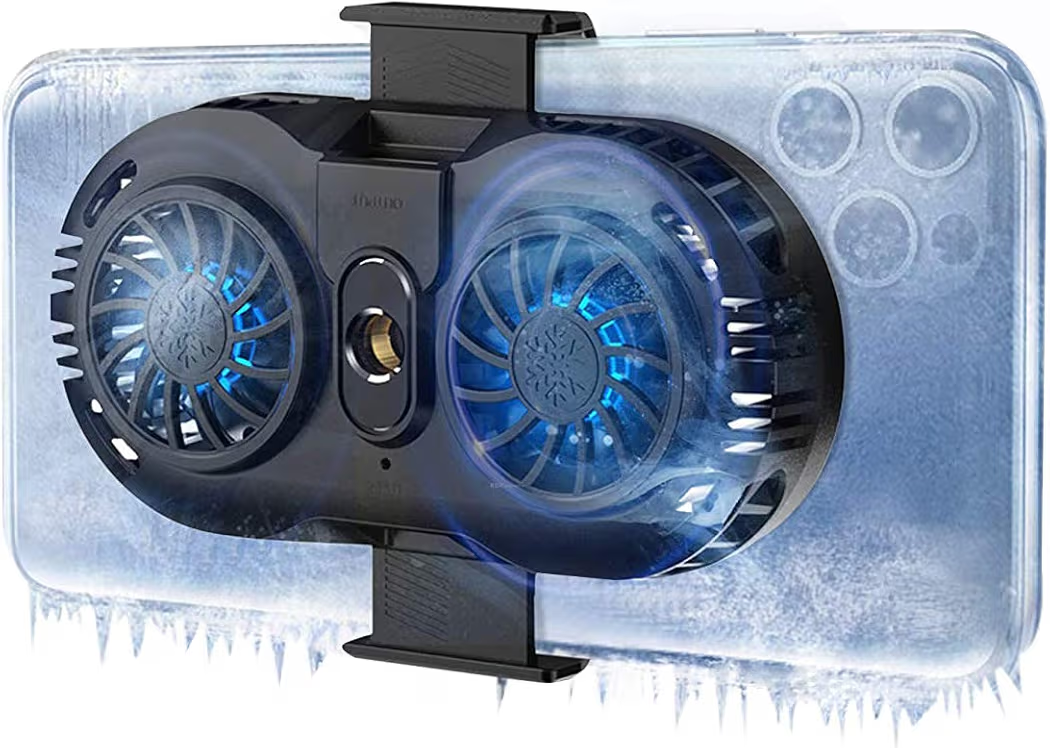
List Price: $20.89
The Neveika Phone Cooler offers affordable active cooling for Samsung Galaxy A16 gamers. Dual semiconductor cooling chips help remove heat while maintaining relatively quiet operation. Additionally, the clip-on design supports many Android devices beyond the Galaxy A16.
Key Features
- Dual semiconductor cooling chips
- Low-noise operation
- Clip-on mounting system
- Wide Android compatibility
- Portable design
Pros
- Affordable price point
- Effective heat reduction
- Simple installation
- Suitable for long gaming sessions
Cons
- Requires external power
- Cooling performance is lower than premium coolers
Compatibility
The Neveika Phone Cooler supports more devices than the Samsung Galaxy A16 alone. Compatibility extends to Samsung Galaxy A15, Galaxy A17, Galaxy A25, Galaxy A35, Galaxy A55, Google Pixel devices, many Android smartphones, and most modern iPhones.
Can Heat Cause Lag and FPS Drops on the Galaxy A16?
Yes, excessive heat can directly cause lag, stuttering, and frame rate drops on the Samsung Galaxy A16. Rising temperatures trigger thermal protection systems that reduce processor performance to prevent hardware damage.
Many gamers assume internet problems cause every performance issue. However, thermal throttling is often responsible when performance gradually worsens during longer sessions.
What Is Thermal Throttling?
Thermal throttling is a protective process that lowers processor speed when temperatures become too high. Samsung devices use thermal management systems to prevent excessive internal temperatures.
Once thermal throttling begins, gaming performance may decline even though the game settings remain unchanged. Consequently, frame rates often become less stable.
Common Signs of Thermal Throttling
- Sudden FPS drops
- Input delay
- Game stuttering
- Longer loading times
- Reduced responsiveness
- Unexpected frame pacing issues
Additional troubleshooting advice is available in our guide covering Galaxy A16 overheating causes and solutions.
Best Gaming Habits to Prevent Overheating
Consistent gaming habits can reduce heat buildup before overheating becomes a problem. Small adjustments often deliver noticeable improvements when combined together.
Rather than relying on a single solution, combining several cooling practices typically produces the best results. Therefore, prevention should always be part of a gaming setup.
Take Short Breaks Between Sessions
Short cooling periods allow the Samsung Galaxy A16 to release accumulated heat. Continuous gaming for several hours naturally increases temperatures.
- Take breaks every 30 to 60 minutes
- Allow natural cooling
- Avoid placing the phone on soft surfaces
Keep Software Updated
Software updates often improve performance optimization and battery efficiency. Samsung periodically releases updates that may improve thermal management.
Furthermore, game developers frequently release patches that reduce resource consumption and improve stability.
Avoid Direct Sunlight
Direct sunlight can dramatically increase smartphone temperatures even before gaming begins. Outdoor gaming exposes the Samsung Galaxy A16 to additional environmental heat.
Whenever possible, choose shaded locations or indoor environments. Consequently, the device starts each gaming session at a lower temperature.
Maintain Free Storage Space
Available storage space helps Android operate more efficiently. Nearly full storage can contribute to reduced system responsiveness.
Because of that, deleting unused files and applications may improve overall device performance during gaming.
Common Galaxy A16 Gaming Overheating Mistakes
Several common mistakes cause unnecessary heat buildup on the Samsung Galaxy A16. Avoiding these habits can improve both gaming performance and battery longevity.
| Mistake | Effect | Better Alternative |
|---|---|---|
| Gaming While Charging | High Heat | Charge Before Playing |
| Maximum Brightness | Higher Battery Drain | Use Moderate Brightness |
| Poor Signal Gaming | Extra Power Usage | Use Stable Wi-Fi |
| Ignoring Updates | Reduced Efficiency | Install Updates Regularly |
| Using Bulky Cases | Heat Retention | Use Slim Cases |
Frequently Asked Questions About Samsung Galaxy A16 Gaming Heat
Why Does My Samsung Galaxy A16 Get Hot While Gaming?
The Samsung Galaxy A16 gets hot during gaming because the processor, graphics hardware, battery, and network components work harder under load. High graphics settings, charging while gaming, and maximum brightness can further increase temperatures.
Can Overheating Damage the Galaxy A16 Battery?
Yes, repeated exposure to excessive heat can accelerate battery degradation over time. Moderate warmth is normal, but frequent overheating should be addressed.
Does a Phone Cooler Really Help?
Yes, active semiconductor phone coolers can reduce temperatures and help maintain more stable gaming performance. Cooling accessories are particularly useful for long gaming sessions.
What Games Make the Galaxy A16 Hottest?
Games with demanding graphics and constant online connectivity usually generate the most heat. PUBG Mobile, Call of Duty Mobile, Mobile Legends, and similar titles often place heavier demands on smartphone hardware.
Is It Safe to Charge While Gaming?
No, charging while gaming is generally not recommended for temperature management. Battery charging and gaming workloads create heat simultaneously.
What Is the Best Cooling Method for the Samsung Galaxy A16?
The best approach combines lower graphics settings, reduced brightness, stable Wi-Fi, proper gaming habits, and active cooling when necessary. Combining several methods usually produces better results than relying on a single solution.
Final Thoughts
Keeping the Samsung Galaxy A16 cool while gaming is achievable with a combination of smart settings and proper gaming habits. Lower graphics settings, moderate brightness levels, stable Wi-Fi connections, and avoiding charging during gameplay can significantly reduce temperatures.
For gamers who regularly play demanding titles, the Neveika Phone Cooler provides an affordable way to reduce heat and improve gaming stability. Additionally, exploring our guides on cooling accessories, portable power options, and protective cases can help create a more complete Samsung Galaxy A16 gaming setup.
Final Recommendations
- Best Phone Cooler for Samsung Galaxy A16:Neveika Phone Cooler – Suitable for reducing heat during long gaming sessions and minimizing thermal throttling.