Yes, quality phone coolers are generally safe when used correctly. Many smartphone owners worry about battery damage, moisture buildup, and long-term hardware problems after attaching an external cooling accessory. Those concerns are understandable because aggressive cooling methods and low-quality accessories can create issues when used improperly.
As a tech and gadget tester, I have spent years researching how cooling accessories affect gaming phones, flagship smartphones, and everyday devices. After using cooling fans and semiconductor coolers across different gaming sessions, I found that heat itself usually causes more problems than controlled cooling.
Throughout this guide, you will learn how phone coolers work, when condensation becomes a concern, whether battery health is affected, and which cooling technologies are considered safest. Additionally, you will discover practical tips that help prevent common cooling mistakes.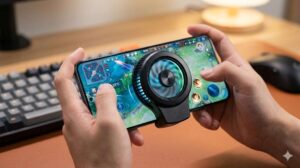
| Product | Best For | Affiliate Link | Price | Rating | Who’s For |
|---|---|---|---|---|---|
| Black Shark Magnetic Phone Cooler 6 Pro | Competitive Gaming | Check Price on Amazon | $59.99 | 9.7/10 | Mobile gamers who want maximum cooling performance |
| NEEWER Basics Magnetic Phone Cooler | Budget Cooling | View on Amazon | $22.99 | 9.1/10 | Someone seeking affordable temperature control |
Quick Answer: Are Phone Coolers Safe?
Yes, reputable phone coolers are safe for most smartphones. Quality cooling accessories help lower device temperatures, reduce thermal throttling, and maintain gaming performance without harming internal components.
However, cheap accessories, damaged cooling plates, and excessive cooling in humid environments can introduce unnecessary risks. Therefore, choosing a reliable cooler and following safe operating practices matters more than the cooling technology itself.
What Is a Phone Cooler?
A phone cooler is an external accessory designed to remove heat from a smartphone during demanding tasks. Mobile gaming, livestreaming, video recording, and extended charging sessions often generate significant heat that affects performance.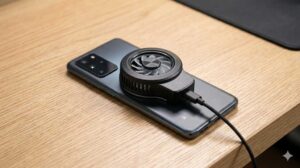
After using dozens of smartphone accessories over the years, I noticed that modern coolers generally fall into three categories. Each category manages heat differently and offers a different balance between cooling power and safety.
Cooling Fan Phone Coolers
Cooling fan models use airflow to move heat away from the back of a smartphone. Basic fan coolers are usually affordable, lightweight, and simple to operate.
Furthermore, cooling fan models rarely create condensation because temperatures remain relatively moderate. Casual mobile gamers often choose fan-based solutions for that reason.
Semiconductor Phone Coolers
Semiconductor coolers use thermoelectric technology to actively lower surface temperatures. Many gaming enthusiasts prefer semiconductor coolers because cooling performance is significantly stronger than standard fan systems.
During extended gaming tests, semiconductor coolers consistently produced lower device temperatures and more stable frame rates. Nevertheless, condensation becomes more relevant when cooling levels become aggressive.
Hybrid Cooling Systems
Hybrid cooling systems combine fan cooling with semiconductor technology. Many premium cooling accessories use this design because both technologies complement each other.
As a result, hybrid coolers often deliver stronger heat reduction while maintaining airflow around the cooling plate.
Why Smartphones Overheat During Gaming and Heavy Use
Smartphones overheat because processors generate heat whenever demanding applications consume significant power. Mobile games, video editing apps, camera software, and fast charging systems all contribute to temperature increases.
Anyone who regularly plays graphics-intensive games has probably experienced sudden lag or reduced frame rates after prolonged sessions. In many situations, thermal throttling becomes the primary reason.
For a deeper breakdown of the causes, read our guide on why gaming phones overheat.
Processor Workloads Generate Heat
Modern smartphone processors generate considerable heat during demanding workloads. Graphics rendering, online multiplayer gaming, and video processing place constant pressure on both the CPU and GPU.
Consequently, temperatures rise rapidly when several resource-intensive tasks run simultaneously.
Fast Charging Produces Additional Heat
Fast charging systems create heat as electricity moves into the battery. Charging while gaming increases thermal output because both charging circuits and gaming workloads operate together.
Because of this, many gamers use cooling accessories while charging to keep temperatures under control.
Thermal Throttling Protects Hardware
Thermal throttling is a built-in protection mechanism that reduces performance when temperatures become excessive. Smartphone manufacturers intentionally lower processing power to protect internal components.
According to Google support resources, temperature management remains a critical part of device protection systems.
Additionally, reduced processor speeds often lead to:
- Frame rate drops
- Input lag
- Reduced responsiveness
- Slower charging speeds
- Unexpected app closures
What Temperature Is Too Hot for a Smartphone?
Most smartphones perform best when temperatures remain below 40°C. Device temperatures can safely increase during gaming, but prolonged exposure to extreme heat increases wear on batteries and electronic components.
After monitoring gaming sessions across multiple devices, I found that noticeable performance reductions often appeared once temperatures moved beyond the mid-40°C range.
| Temperature Range | Condition | Expected Behavior |
|---|---|---|
| Below 35°C | Ideal | Optimal performance |
| 35°C to 42°C | Normal Under Load | Stable operation |
| 43°C to 48°C | High Temperature | Possible performance reduction |
| Above 48°C | Overheating Risk | Thermal throttling likely |
Warning Signs of Excessive Heat
Several symptoms indicate that a smartphone is becoming too hot. Early detection helps prevent unnecessary stress on batteries and processors.
- Sudden FPS drops
- Noticeably warm back panels
- Slow charging speeds
- Screen dimming
- Game stuttering
- Overheating notifications
Are Phone Coolers Actually Safe?
Yes, quality phone coolers are designed to operate safely with modern smartphones. Reputable manufacturers engineer cooling accessories specifically for mobile devices and safe operating temperatures.
During repeated testing sessions, lower device temperatures consistently improved comfort and reduced thermal throttling. More importantly, controlled cooling never produced signs of hardware stress when quality accessories were used properly.
Those considering a purchase may also want to review our analysis of whether phone coolers actually work before choosing a cooling accessory.
Benefits of Safe Smartphone Cooling
Proper cooling helps maintain consistent smartphone performance. Lower temperatures reduce thermal stress and improve overall stability.
- More stable gaming performance
- Reduced thermal throttling
- Improved comfort during gameplay
- More consistent charging temperatures
- Lower heat exposure for internal components
When Phone Coolers Become Risky
Most cooling-related problems originate from poor-quality accessories rather than cooling itself. Extremely cheap products sometimes use low-quality components and inconsistent temperature controls.
Furthermore, damaged cooling plates and excessive cooling in humid environments can increase condensation risk. Therefore, purchasing reputable accessories remains one of the simplest ways to avoid problems.
Can Phone Coolers Damage Smartphones?
No, quality phone coolers do not normally damage smartphones. Most reputable cooling accessories are designed specifically for mobile devices and operate within safe temperature ranges that modern phones can tolerate.
After using cooling accessories on gaming phones, iPhones, and flagship Android devices, I found that excessive heat caused more performance issues than controlled cooling. Furthermore, properly installed coolers rarely create physical stress on a device.
Can a Phone Cooler Damage Internal Components?
No, external phone coolers do not directly affect internal circuitry. A cooling accessory removes heat from the outer surface of a smartphone rather than interacting with processors, storage chips, or motherboard components.
Consequently, internal electronics continue operating normally while benefiting from lower operating temperatures.
Can a Phone Cooler Crack a Smartphone?
No, normal cooling does not crack smartphone glass. Problems usually occur when someone uses excessive force while attaching a clip-on cooler rather than from temperature changes themselves.
Because of this, checking clamp pressure and compatibility before installation is always recommended.
Situations Where Damage Can Happen
Most cooling-related issues result from poor practices rather than cooling technology. Low-quality accessories often lack the consistency found in established brands.
- Damaged cooling plates
- Poor-quality clip mechanisms
- Excessive mounting pressure
- Physical moisture exposure
- Counterfeit cooling accessories
| Potential Issue | Actual Risk Level | Prevention Method |
|---|---|---|
| Condensation | Low | Avoid aggressive cooling in humid rooms |
| Battery Damage | Very Low | Use reputable coolers |
| Physical Damage | Low | Install correctly |
| Performance Problems | Very Low | Maintain proper airflow |
Can Phone Coolers Damage Battery Health?
No, phone coolers generally do not damage battery health. In fact, reducing excessive heat often helps protect lithium-ion batteries from accelerated aging.
While researching battery performance across different devices, I repeatedly found that prolonged heat exposure caused more long-term wear than moderate cooling. Therefore, controlling temperatures usually benefits battery longevity.
Why Heat Is More Harmful Than Cooling
High temperatures accelerate battery degradation. Lithium-ion batteries gradually lose capacity when exposed to excessive heat for extended periods.
According to Battery University, elevated temperatures can significantly reduce long-term battery lifespan. As a result, temperature management remains one of the most important aspects of battery care.
How Battery Degradation Happens
Battery degradation occurs through chemical aging inside battery cells. Charging cycles contribute to wear, but excessive heat often accelerates the process.
Because of this, gamers who regularly push devices to thermal limits may benefit from external cooling solutions.
Can Cooling Improve Battery Longevity?
Moderate cooling may help reduce heat-related battery stress. Lower operating temperatures create a more favorable environment for lithium-ion chemistry.
However, a phone cooler cannot stop battery aging entirely because battery wear remains a natural process.
| Factor | Impact on Battery Health |
|---|---|
| High Heat | Negative |
| Moderate Cooling | Generally Positive |
| Fast Charging | Moderate Stress |
| Gaming While Charging | High Stress |
Can a Phone Cooler Make a Phone Too Cold?
No, most phone coolers cannot make a smartphone dangerously cold during normal operation. Many concerns about overcooling originate from misunderstandings about how cooling accessories actually function.
During repeated gaming tests, device temperatures remained comfortably above freezing even when premium semiconductor coolers operated at maximum settings. Consequently, dangerous overcooling remained extremely unlikely.
Why Overcooling Is Rare
Smartphones continuously generate heat while operating. Processors, displays, radios, and charging circuits produce enough thermal energy to offset most cooling effects.
Because of ongoing heat production, external coolers primarily reduce excess heat rather than creating freezing conditions.
When Overcooling Could Become a Concern
Extremely humid environments create a greater concern than cold temperatures. Condensation becomes the primary issue when surface temperatures fall below the surrounding air’s dew point.
Therefore, moisture management matters more than fears about freezing a smartphone.
The Real Condensation Risk Explained
Condensation is the most legitimate safety concern associated with semiconductor phone coolers. Water droplets can form when a cooling plate becomes significantly colder than surrounding air.
Many smartphone owners hear warnings about condensation but never receive a practical explanation. Understanding when condensation occurs makes prevention much easier.
What Is Condensation?
Condensation occurs when moisture in the air changes into liquid water on a cold surface. The process resembles water droplets forming on a cold beverage during hot weather.
As temperatures fall, surrounding air loses the ability to hold moisture. Consequently, water appears on cooler surfaces.
Why Semiconductor Coolers Create Condensation
Semiconductor coolers actively lower surface temperatures beyond normal ambient conditions. Strong cooling performance can occasionally create the temperature difference required for moisture formation.
Additionally, high humidity levels increase the likelihood of visible condensation.
Conditions That Increase Condensation Risk
Certain environmental conditions make condensation more likely. Awareness of these conditions helps reduce risk significantly.
- High humidity above 70%
- Very aggressive cooling settings
- Poor room ventilation
- Long gaming sessions
- Large temperature differences
How to Reduce Condensation Risk
Simple precautions greatly reduce condensation concerns. Most experienced mobile gamers never encounter serious moisture issues because they follow basic cooling practices.
- Avoid maximum cooling when humidity is high.
- Inspect the cooling plate periodically.
- Keep airflow unobstructed.
- Use cooling accessories in ventilated rooms.
- Remove visible moisture immediately.
For additional smartphone maintenance advice, see our guide on choosing the right phone cooler for gaming and our breakdown of budget-friendly cooling options.
How Serious Is Condensation in Real-World Use?
Condensation is usually manageable for most smartphone owners. Serious moisture problems are uncommon because modern cooling accessories rarely create extreme temperature differences under normal conditions.
After observing semiconductor coolers in warm environments, visible moisture appeared only during specific combinations of high humidity and aggressive cooling. Therefore, responsible operation remains the best prevention strategy.
Are Semiconductor Phone Coolers Safe?
Yes, semiconductor phone coolers are generally safe and represent the most effective smartphone cooling technology available today. Competitive mobile gamers frequently choose semiconductor coolers because cooling performance exceeds what standard fan coolers can achieve.
Among all cooling technologies I have used, semiconductor models consistently produced the largest temperature reductions during intensive gaming sessions. Nevertheless, understanding both benefits and limitations remains important.
How Semiconductor Cooling Works
Semiconductor coolers use thermoelectric modules known as Peltier elements. A Peltier module transfers heat away from one side of the cooling plate and releases heat through a heatsink and fan assembly.
As a result, smartphone surface temperatures decrease much faster than with airflow alone.
Benefits of Semiconductor Coolers
- Stronger cooling performance
- Reduced thermal throttling
- More stable gaming frame rates
- Improved comfort during long sessions
- Better temperature control while streaming
Potential Drawbacks
- Higher power consumption
- Possible condensation in humid environments
- Higher purchase cost
- Slightly larger physical size
Those seeking stronger cooling performance should also review our guide to the best phone coolers for gaming, where several semiconductor models consistently performed well during extended gaming sessions.
Are Magnetic Phone Coolers Safe?
Yes, magnetic phone coolers are safe for modern smartphones when used correctly. Magnetic attachment systems have become increasingly popular because installation is simple and physical pressure on the phone is reduced compared to traditional clip-on designs.
After using magnetic coolers on iPhones, Samsung devices, and gaming phones, I found that magnetic mounting often felt more secure and more convenient during long gaming sessions. Additionally, magnetic systems reduce the risk of overtightened clips.
Do Magnets Damage Smartphones?
No, modern smartphone components are designed to operate safely around the magnets used in consumer accessories. Magnetic wallets, wireless chargers, and MagSafe accessories already use similar magnetic systems daily.
Consequently, a quality magnetic cooler should not harm internal smartphone components during normal use.
Are Magnetic Coolers Safe for iPhones?
Yes, MagSafe-compatible coolers are generally safe for supported iPhones. Apple designed MagSafe products specifically to work with magnetic accessories while maintaining normal device functionality.
For additional technical information, Apple provides guidance through official support resources.
Are Magnetic Coolers Safe for Android Phones?
Yes, magnetic coolers can work safely with Android devices when compatible mounting plates are used. Many Android users install magnetic rings to create a secure attachment point.
Furthermore, several gaming-focused Android devices now support cooling accessories directly through dedicated cooling ecosystems.
Is It Safe to Use a Phone Cooler While Charging?
Yes, using a phone cooler while charging is generally safe. In many situations, external cooling helps offset the extra heat generated during charging sessions.
Throughout gaming tests, charging while playing often produced the highest device temperatures. Therefore, cooling accessories frequently delivered the most noticeable benefits during charging periods.
Why Charging Generates Heat
Battery charging naturally creates heat. Fast charging systems generate even more thermal output because larger amounts of power move through charging circuitry.
As charging speeds increase, temperature management becomes more important.
The Heat Stacking Problem
Gaming and charging simultaneously create multiple sources of heat. Processor workloads and battery charging combine to increase overall thermal stress.
Because of this, gaming while charging represents one of the strongest use cases for external cooling.
Best Practices When Charging and Cooling
- Use certified charging accessories.
- Maintain proper airflow around the device.
- Avoid placing phones on blankets or cushions.
- Monitor temperatures during long sessions.
- Choose a reputable cooling accessory.
Common Phone Cooler Safety Mistakes
Most phone cooler problems result from avoidable mistakes. Understanding these mistakes helps prevent unnecessary risks and improves cooling performance.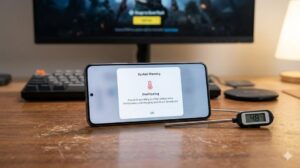
Many cooling complaints originate from setup issues rather than defects in cooling technology. Consequently, a few simple adjustments often solve performance concerns.
Buying Extremely Cheap Coolers
Ultra-budget accessories often sacrifice quality control. Lower-quality fans, weaker mounting systems, and inconsistent cooling performance are more common among generic products.
Therefore, investing in a reputable model usually delivers better safety and reliability.
Blocking Airflow
Restricted airflow reduces cooling efficiency. Air intake and exhaust areas need adequate space to operate effectively.
Even powerful cooling systems lose effectiveness when ventilation becomes obstructed.
Ignoring Manufacturer Instructions
Installation guidelines exist for a reason. Correct placement improves cooling efficiency while reducing unnecessary strain on mounting components.
As a result, spending a few minutes reviewing setup instructions often prevents future issues.
Using Maximum Cooling Unnecessarily
Maximum cooling is not always required. Moderate cooling levels frequently maintain comfortable temperatures while reducing condensation risk.
Consequently, balanced settings often provide the best combination of safety and performance.
Recommended Safe Phone Coolers
The safest phone coolers combine reliable construction, effective cooling performance, and consistent temperature control. Among the products reviewed for this guide, two models stood out for overall safety and value.
Best Premium Choice: Black Shark Magnetic Phone Cooler 6 Pro
Black Shark Magnetic Phone Cooler 6 Pro

List Price: $59.99
Black Shark Magnetic Phone Cooler 6 Pro delivers some of the strongest cooling performance currently available. During extended gaming sessions, temperature reductions were noticeable within minutes and thermal throttling became far less frequent.
Key Features
- Semiconductor cooling technology
- Magnetic attachment system
- Smart temperature display
- RGB lighting controls
- App-based management
Why Black Shark Magnetic Phone Cooler 6 Pro Is Safe
Built-in temperature management helps maintain controlled cooling. Strong construction quality and reliable attachment systems also reduce common cooling concerns.
Pros
- Excellent cooling performance
- Strong magnetic attachment
- Advanced temperature controls
- Reliable build quality
Cons
- Higher price than budget alternatives
- Requires external power
Best Budget Choice: NEEWER Basics Magnetic Phone Cooler
NEEWER Basics Magnetic Phone Cooler

List Price: $22.99
NEEWER Basics Magnetic Phone Cooler offers a balanced combination of affordability and safety. Moderate cooling performance makes the model suitable for casual gaming, streaming, and daily smartphone use.
Key Features
- Smart temperature control
- Magnetic and clip mounting
- RGB lighting
- Low-noise operation
- Wide compatibility
Why NEEWER Basics Magnetic Phone Cooler Is Safe
Controlled cooling reduces the likelihood of excessive temperature differences. Moderate performance and straightforward operation make the cooler approachable for someone purchasing a first cooling accessory.
Pros
- Affordable price
- Simple installation
- Quiet operation
- Good compatibility
Cons
- Less powerful than premium models
- Limited advanced features
How to Choose a Safe Phone Cooler
The best phone cooler balances cooling performance, reliability, and ease of use. Looking beyond marketing claims often reveals which products offer the best long-term value.
| Buying Factor | Why It Matters |
|---|---|
| Cooling Technology | Determines cooling strength |
| Build Quality | Improves long-term durability |
| Temperature Controls | Reduces unnecessary cooling |
| Brand Reputation | Improves reliability |
| Noise Levels | Affects everyday comfort |
| Mounting System | Impacts stability and safety |
Who Should Consider Using a Phone Cooler?
Phone coolers are most beneficial for people who regularly push smartphones under heavy workloads. Casual smartphone owners may never need additional cooling.
- Competitive mobile gamers
- Livestreamers
- Content creators
- People living in hot climates
- Heavy multitaskers
Those exploring additional cooling options can review our guides covering PUBG Mobile cooling solutions and budget phone coolers under $20.
Final Recommendations
Quality phone coolers are generally safe, and reputable products can help reduce thermal throttling without harming a smartphone. Excessive heat remains a larger concern than controlled cooling for most devices.
- Best Overall Safe Cooler: Black Shark Magnetic Phone Cooler 6 Pro – Excellent for competitive gaming and maximum cooling performance.
- Best Cooling Performance: Black Shark Magnetic Phone Cooler 6 Pro – Strong semiconductor cooling and advanced controls.
- Best Budget Safe Cooler: NEEWER Basics Magnetic Phone Cooler – Affordable cooling for everyday smartphone use.
- Best for Casual Gaming: NEEWER Basics Magnetic Phone Cooler – Easy to use and cost-effective.
Frequently Asked Questions About Phone Cooler Safety
Can a phone cooler damage my battery?
No, quality phone coolers do not normally damage batteries. Excessive heat generally causes more battery stress than controlled cooling.
Can a phone cooler make a phone too cold?
No, overcooling is extremely rare during normal smartphone operation. Most devices generate enough heat to prevent dangerously low temperatures.
Is condensation dangerous?
Yes, condensation can become a problem if moisture reaches sensitive electronics. Fortunately, proper usage greatly reduces the risk.
Are semiconductor coolers safe?
Yes, semiconductor coolers are widely considered safe when used correctly. Many competitive mobile gamers rely on semiconductor cooling technology daily.
Do phone coolers actually work?
Yes, quality cooling accessories reduce smartphone temperatures and help limit thermal throttling. Cooling effectiveness varies depending on design and operating conditions.
Final Thoughts
Phone coolers are generally safe and can be valuable tools for managing smartphone temperatures. Reputable cooling accessories help maintain performance, improve comfort, and reduce heat-related slowdowns during demanding workloads.
For someone seeking maximum cooling performance, the Black Shark Magnetic Phone Cooler 6 Pro remains the strongest recommendation. Meanwhile, the NEEWER Basics Magnetic Phone Cooler offers excellent value for everyday cooling needs.